
Can ChatGPT Upscale Images? We Tested It (2026 Answer)
ChatGPT can't truly upscale — it regenerates a similar image capped near 1024px, and faces or text may change. We tested it against a real 4x upscaler.
Can ChatGPT Upscale Images? Here's What Actually Happens
Short answer: no — not in the way you're hoping.
Ask ChatGPT to "upscale this image to 4K" and it will cheerfully hand something back. But it hasn't enlarged your image. It has generated a new image that resembles yours, capped at roughly 1024–1792 pixels, with faces, text, and small details subtly — sometimes not so subtly — rewritten.
Plenty of articles ranking for this question get that wrong, and a few claim the opposite outright. So instead of arguing, we ran the test: the same images through ChatGPT and through a real 4x upscaler, side by side, crops and pixel counts included.
Here's everything you need to know:
Chapter 1: The Short Answer
ChatGPT re-renders; upscalers reconstruct. That one distinction explains every result in this article.
An AI image upscaler takes your exact pixels and generates new detail around them — the content stays locked, the resolution multiplies. ChatGPT's image tooling works the other way: it interprets your picture, then paints a fresh one from that understanding. Your image is the reference, not the substrate.

Three hard facts before the tests:
- Resolution ceiling. ChatGPT image outputs top out around 1024×1024 (square) or 1792×1024 (wide). Typing "8K please" changes nothing.
- Content drift. Faces, logos, and lettering are re-imagined, not preserved. The industry nickname is generative drift.
- No settings. There's no scale factor, no fidelity slider, no "keep identical" switch that actually locks pixels.

Chapter 2: What ChatGPT Actually Does to Your Image
Under the hood, "upscale this" becomes "draw this again, nicely."
Re-rendering, not upscaling
When you attach a photo and ask for an enhancement, the model encodes your image into a description-like internal representation, then generates a brand-new image from it. The output can look cleaner at a glance — smoother, more contrast — which is exactly why so many people believe it worked.
The resolution ceiling
Whatever the input, the output lands at the model's native sizes — about one to two megapixels. For context: a 4x upscale of an ordinary 1200×800 photo is 4800×3200, or fifteen megapixels. ChatGPT physically cannot hand you that file.
Generative drift: faces, text, logos
The most expensive failure mode. Because the output is a repaint:
- Faces come back as someone very similar — a sibling, not the person.
- Text re-renders as plausible letterforms that often say something else.
- Logos and patterns get "corrected" toward generic versions.
For a meme, harmless. For a family photo or a product shot, disqualifying.
Chapter 3: We Tested It — ChatGPT vs a Real Upscaler
One vintage family photo, two tools, judged on pixel count, faces, and crop-level detail. No retouching on either output.
The setup: we asked ChatGPT to "Upscale this image to 4K. Keep everything absolutely identical." The same photo went through our 4x image upscaler untouched.
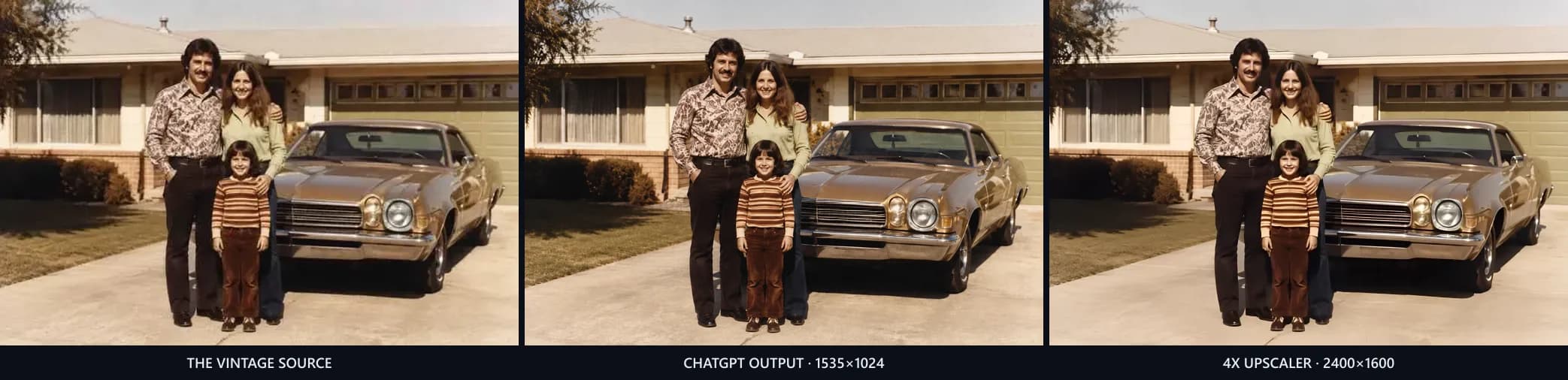
At thumbnail size, all three look like the same photo. That's exactly the trap. Now the numbers:
| ChatGPT | 4x upscaler | |
|---|---|---|
| Output size | 1535×1024 — despite "4K" in the prompt | 2400×1600 |
| The people | Similar strangers | The same people |
| Shirt pattern, car, house | Plausibly re-invented | Preserved |
| Film-era character | Repainted clean | Kept |
The face test
Zoom to the father and everything this article claims becomes visible in one image:
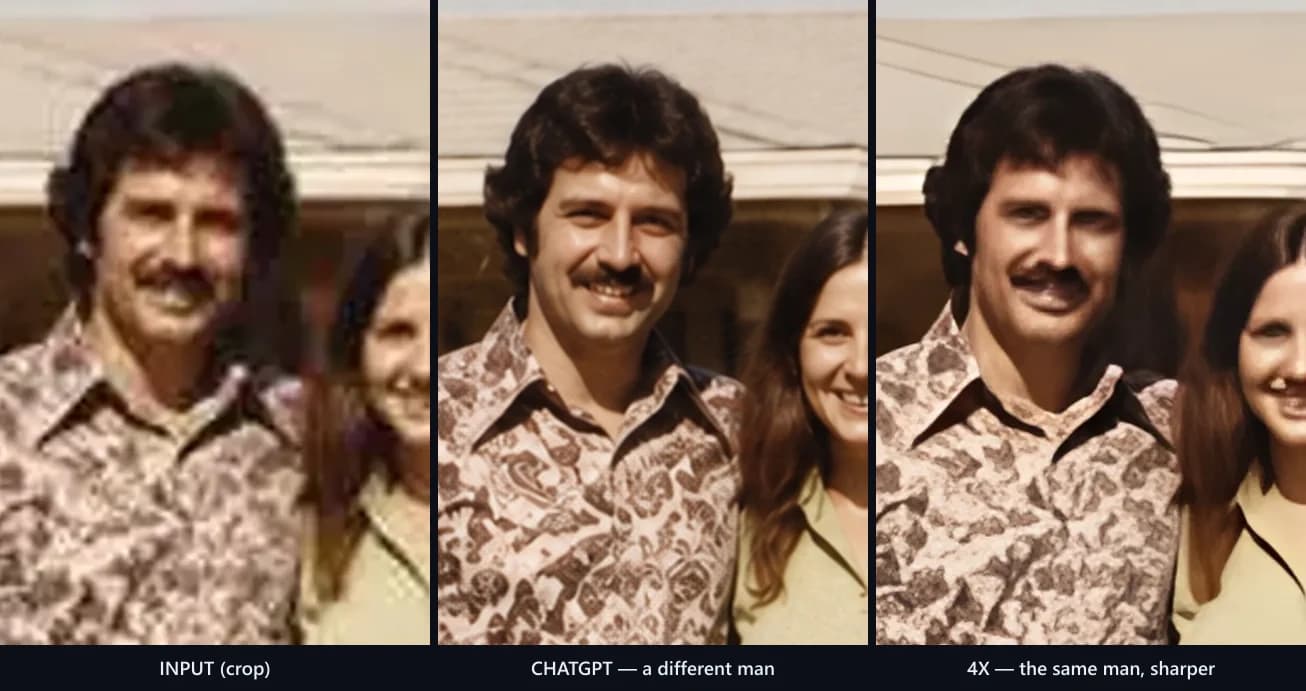
Look closely at the middle panel. Different face shape, different features, a re-drawn shirt pattern — ChatGPT returned a very handsome photo of somebody else. The right panel is the same man from the source, just four times sharper.
And the "4K" request? Politely ignored: 1535×1024 is the ceiling, exactly as Chapter 1 predicted.
What this means for text and AI art
We'll spare you two more grids — the mechanism doesn't change with the subject:
- Product shots with text: lettering gets re-rendered into plausible-but-wrong words, which disqualifies any listing or catalog use.
- AI-generated art: ChatGPT returns a variation of your character, not an enlargement. If you generated something you love, a re-roll is precisely what you don't want — upscaling it keeps the art you chose.
One family photo was enough to demonstrate all of it: the ceiling, the drift, and the difference.
Chapter 4: When ChatGPT Is Still Useful
Fairness matters: re-rendering is a feature when you want the image reinterpreted.
Legitimate jobs for ChatGPT's image tools:
- Creative restyling — "make this photo look like a watercolor."
- Loose restoration where identity doesn't matter — an old landscape, not grandpa.
- Ideation — generating variations of a concept to react to.
If you do experiment, two prompts that minimize (not eliminate) drift:
"Reproduce this image as faithfully as possible. Do not change composition, faces, colors, or any text. Improve clarity only."
"Restore this photo. Preserve the exact identity of every person. Do not add, remove, or reinterpret any element."
Manage expectations: the ceiling and the repaint mechanism still apply. These prompts steer the reinterpretation; they can't disable it.
Chapter 5: How to Actually Upscale an Image
The job ChatGPT can't do takes about ten seconds with the right tool.

- Upload your image to the image upscaler — JPG, PNG, or WebP up to 10MB.
- Click Upscale. The model generates real detail at a fixed 4x — sixteen times the pixels, content locked.
- Compare and download. A before/after slider shows exactly what changed (spoiler: the resolution, nothing else). No watermark.
Free plan covers about 10 images a month; each run costs 2 credits. If your image is AI-generated art from a text-to-image tool, this is the standard finishing step before printing or selling it.
Chapter 6: ChatGPT vs Dedicated Upscalers — The Table
One look, whole story:
| ChatGPT | Dedicated AI upscaler | |
|---|---|---|
| Mechanism | Regenerates a similar image | Enlarges your image with new detail |
| Max output | ~1024–1792px | 4x input (e.g. 2400×1600 and beyond) |
| Faces & text | May change | Preserved |
| Scale control | None | Fixed, predictable 4x |
| Cost | Subscription for image features | Free to start |
| Best for | Restyling, ideation | Enlarging, print prep, e-commerce |
Prefer doing it in software you already own? Photoshop has three methods — more control, more clicks. Canva's upscaler sits behind its Pro plan.
FAQ: ChatGPT and Image Upscaling
What's the maximum resolution ChatGPT can output?
Roughly 1024×1024 for square images and 1792×1024 for wide ones. Prompting for "4K" or "8K" changes the style of the render, not the pixel dimensions of the file you receive.
Why did the faces change when ChatGPT "upscaled" my photo?
Because it didn't enlarge your photo — it generated a new image based on it. Faces are re-imagined from the model's understanding, which lands close but not identical. A dedicated upscaler preserves faces because it never repaints the image.
Is ChatGPT image enhancement free?
Image features require a paid ChatGPT plan for meaningful use, and heavy image generation is rate-limited. By comparison, a dedicated upscaler's free tier (ours included) covers about 10 full-resolution upscales a month.
How do I upscale an image ChatGPT generated for me?
Download the image, then run it through a real upscaler — this one does a fixed 4x free. That combination (generate in ChatGPT, upscale separately) is the correct pipeline; asking ChatGPT to upscale its own output just triggers another re-roll.
Is ChatGPT better than Photoshop for enlarging images?
No — they're not even playing the same sport. Photoshop interpolates your actual pixels (three methods, compared here); ChatGPT regenerates the picture. For enlargement specifically, Photoshop, Canva, or a dedicated upscaler all beat ChatGPT, in ascending order of convenience.
Will ChatGPT ever do true upscaling?
Possibly — the tooling evolves fast. But re-rendering is architectural, not a bug: image generation models create images, they don't resample them. Purpose-built super-resolution models remain the right tool, the same way you don't ask a painter to photocopy.
Ten seconds, 4x, nothing changed but the resolution: upscale an image free and drag the before/after slider yourself.
Author

Categories
More Posts

Best AI Video Generators With Native Audio (2026 Compared)
Which AI video generators produce sound — dialogue, SFX, ambience, music — in one pass? We compare Veo 3, Kling 3, Kling 2.6 and Seedance 2, plus what audio adds to the bill.
Can You Use AI Music on YouTube? (Copyright & Money, 2026)
Yes, but four gates decide whether an AI song can earn money on YouTube: your license, copyright, YouTube's AI rules and Content ID. Full checklist inside.

How to Remove a Background in GIMP: 5 Methods (GIMP 3.0)
Step-by-step guide to removing backgrounds in GIMP — Fuzzy Select, Color to Alpha, Layer Masks, hair-edge fixes, and when a 2-second AI tool wins.